Spaghetti diagram template
Created by:

Track movement patterns and find workflow bottlenecks with clear visual lines that show where time gets wasted
Categories
- Software & IT
- Flowchart
- Whiteboard Template
KEY FEATURES
Problem Solving
Documentation
Analysis
When employees or materials follow convoluted paths through a workspace, the result is wasted effort and reduced productivity. Inefficient movement patterns can cost organizations significant time and resources. A spaghetti diagram helps you see and understand these movement patterns, whatever the context.
A spaghetti diagram maps the actual paths people take to complete their work, showing you inefficiencies that might otherwise remain hidden. The lines that emerge from this analysis highlight exactly where processes break down and point toward actionable improvements. Organizations across industries use spaghetti diagrams to optimize workflows and eliminate unnecessary movement.
What is a spaghetti diagram?
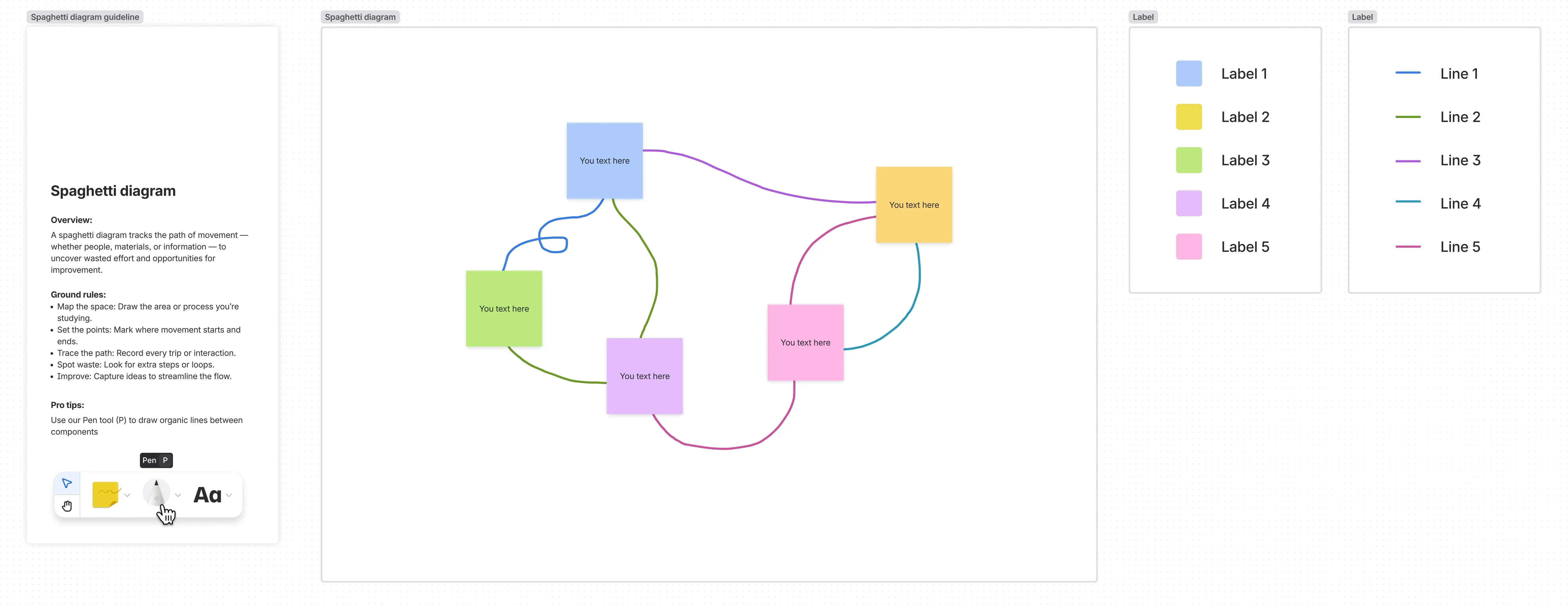
A spaghetti diagram tracks and visualizes movement within a specific part of a process. The technique involves drawing continuous lines that follow a person or item as they move through their workflow. These lines often create a tangled pattern resembling spaghetti, which gives the method its name.
This visualization technique helps identify inefficiencies by capturing motion waste, which is one of the most significant productivity drains in any workplace. The diagram reveals patterns that might not be apparent through casual observation, such as excessive backtracking or unnecessarily long distances between related workstations.
Spaghetti diagrams don't require specialized software or extensive training, making them accessible to teams of all skill levels and departments.
What is a spaghetti diagram template?
A free spaghetti diagram template provides a framework for creating these movement visualizations. Instead of starting with a blank page, you can use pre-designed layouts with designated areas for floor plans, movement tracking, and analysis documentation.
Templates ensure consistency when multiple team members create diagrams across different processes or time periods. This standardization enables more effective comparisons and helps organizations track improvement over time. It also reduces setup time, allowing teams to focus on the actual analysis.
What is a spaghetti diagram template used for?
Organizations use spaghetti diagram templates to analyze various movement and flow challenges. Common applications include:
Analyzing workspace layout: Study how employees move through office environments and identify layout optimization opportunities. This helps organizations create more efficient workspaces that reduce daily travel time.
Optimizing material flow: Track inventory movement through warehouses and production facilities to eliminate bottlenecks. Teams can redesign storage locations and handling processes for smoother operations.
Identifying bottlenecks: Pinpoint specific areas where workflow interruptions occur most frequently. With these insights, you can focus on improvements that have the greatest impact on overall efficiency.
Employee movement analysis: Document staff patterns to improve workspace design and reduce unnecessary travel time. Understanding these patterns supports better resource placement and workflow organization.
Customer journey mapping: Analyze how customers navigate retail spaces or service environments. This analysis helps businesses improve customer experience and operational flow simultaneously.
Optimizing production sequence: Streamline manufacturing processes by identifying inefficient material handling. Organizations can reduce production time and cost through strategic process redesign.
The spaghetti diagram template seamlessly integrates with continuous improvement initiatives and Lean methodology practices. It provides concrete data that supports evidence-based decisions about layout changes and process modifications.
Why use a spaghetti diagram template?
A spaghetti diagram template streamlines the diagram creation process by providing a clear structure and guidance. They can help teams capture the most relevant movement data while maintaining consistency across different analyses.
The visual format helps teams quickly interpret complex movement patterns and share findings. This shared understanding accelerates decision-making and builds consensus around necessary improvements.
Benefits of using a spaghetti diagram template
Visualizes workflow inefficiencies
Templates help teams identify where movement becomes excessive or redundant. The visual representation immediately highlights problem areas, making it easy to see patterns like repeated visits to the same location or unnecessarily complex routing between workstations.
This clear visual format is often necessary during collaborative meetings and brainstorming sessions. When all stakeholders can see the same inefficiencies, they can be more productive when developing solutions.
Reduces unnecessary movement
Once excessive steps and backtracking patterns are identified, teams can develop strategies to eliminate them. The diagram pinpoints exactly where time and energy are being wasted, providing the foundation for targeted layout improvements and workflow designs.
Improves process flow
Templates reveal opportunities for smoother workflows and help design optimal task sequences. They highlight where current workflow diagrams may not reflect actual practices, allowing teams to align processes with reality.
Enhanced workflow translates to faster task completion and reduced frustration. When processes align with efficiency principles, teams can dedicate more time to value-added activities rather than navigating poorly designed workflows.
Keeps teams aligned
Shared diagrams create a common understanding of process improvement opportunities. All team members work from the same visual reference, which reduces miscommunication and conflicting perspectives about necessary changes.
This alignment encourages collaborative problem-solving. Team members can reference specific diagram elements when discussing targeted solutions, leading to more productive conversations about optimization strategies.
Supports informed decisions
Templates provide visual evidence that supports process change recommendations. Instead of relying on assumptions about movement patterns, teams can present concrete data showing current inefficiencies and improvement opportunities.
A spaghetti diagram template strengthens business cases for workspace modifications or investments in equipment. Leadership can better understand the rationale behind proposed improvements when they can visualize wasted movement.
How to use the spaghetti diagram template
- 1
Select the process area
Identify a specific workspace or process for analysis. Look at areas where movement inefficiencies are suspected or where team members have reported workflow challenges.
Start with a manageable scope rather than attempting to analyze an entire facility. Concentrating your analysis on a single department or process typically gets you more actionable insights.
- 2
Create the layout
Develop a simple floor plan or workspace sketch that includes all relevant elements. Document workstations, equipment locations, storage areas, and frequently visited destinations such as printers or meeting rooms.
The layout should accurately represent spatial relationships between key elements, though precise scaling isn't required.
- 3
Trace the movement
Observe and document the actual path taken by a person or item during their typical workflow. Draw continuous lines on the layout to represent real movement from start to completion.
Consider tracking multiple individuals performing the same tasks to identify whether inefficiencies are systematic issues or individual variations in approach.
- 4
Label key points
Mark significant locations such as starting points, frequent stops, and areas requiring multiple visits. Add timestamps or contextual notes about delays to provide additional analysis depth.
- 5
Analyze the lines
Examine the diagram for long distances between related work areas, circulating patterns indicating backtracking, and crossing paths that may create congestion. You can compare the lines to your process flowchart to find inefficiencies.
Pay attention to frequently repeated movements, as these represent the greatest opportunities for time savings when repeated across multiple people and extended time periods.
- 6
Suggest changes and share findings
Develop improvement recommendations based on the analysis, such as workstation rearrangement, equipment relocation, or process step consolidation. Present your findings to stakeholders and gather input on proposed modifications.
Use the spaghetti diagram as a communication tool to help others understand current challenges and visualize how suggested changes will improve workflow efficiency. Having a visual document enhances project collaboration and stakeholder engagement.
Create a spaghetti diagram with Confluence
Confluence's online whiteboards can help you easily create your very own digital spaghetti diagrams. Teams can collaborate in real time, make quick adjustments, and document improvement concepts as they develop.
Using the free spaghetti diagram template in Confluence streamlines the analysis process while promoting knowledge sharing across the organization. Teams can access standardized templates, learn from other departments' analyses, and build upon improvement methodologies.
Having a shared template helps turn complex movement patterns into clear flowcharts that drive meaningful process improvements and support organizational efficiency goals.
Explore more templates to supercharge teamwork
Empower everyone, on every team. Build, connect, and deliver your biggest ideas seamlessly across Atlassian apps using our complete collection of ready-made workflows.